
/Swept%20Website/All%20Icons/icons/scheduled%20event.svg)


QuickBooks Online Integration
Track Hours in Swept. Pay in QuickBooks.
Swept sends accurate, manager-approved hours straight to QuickBooks Online. No double entry. No spreadsheet headaches. Just a calmer, more controlled payday.
Why it matters
Payroll shouldn't have to be a puzzle.
Swept and QuickBooks Integration removes the manual work and last-minute surprises that make payroll harder than it needs to be.
Keep employee records aligned
Catch issues before payroll
How it works
Three simple steps to a smoother payday.
Connect and match your team, review and approve their hours, then run payroll in QuickBooks Online. No extra work required.
Choose a step to see how it works.
Step 1
Connect. Match. Move on.
Connect QuickBooks Online and review employee matches without bouncing between screens.
- Match existing QuickBooks employees
- Create missing QuickBooks records from Swept
Employee Mapping
Jas Reyes
Jas Reyes
Matched
Mike Santos
Mike Santos
Matched
Nicholas Leister
Select QuickBooks employee...
Unmatched
Step 2
Only approved hours move.
Managers review cleaner hours in Swept and decide what is ready for payroll.
- Review hours before anything syncs
- Send manager-approved time to QuickBooks
Payroll Reports
Jenna Lim
Mon · Harbour Centre
7 hr 0 min
Paloma Dimate
Tue · City Hall
4 hr 0 min
Kris Sanchez
Wed · Bedford Place
3 hr 1 min
Step 3
Run payroll with fewer surprises.
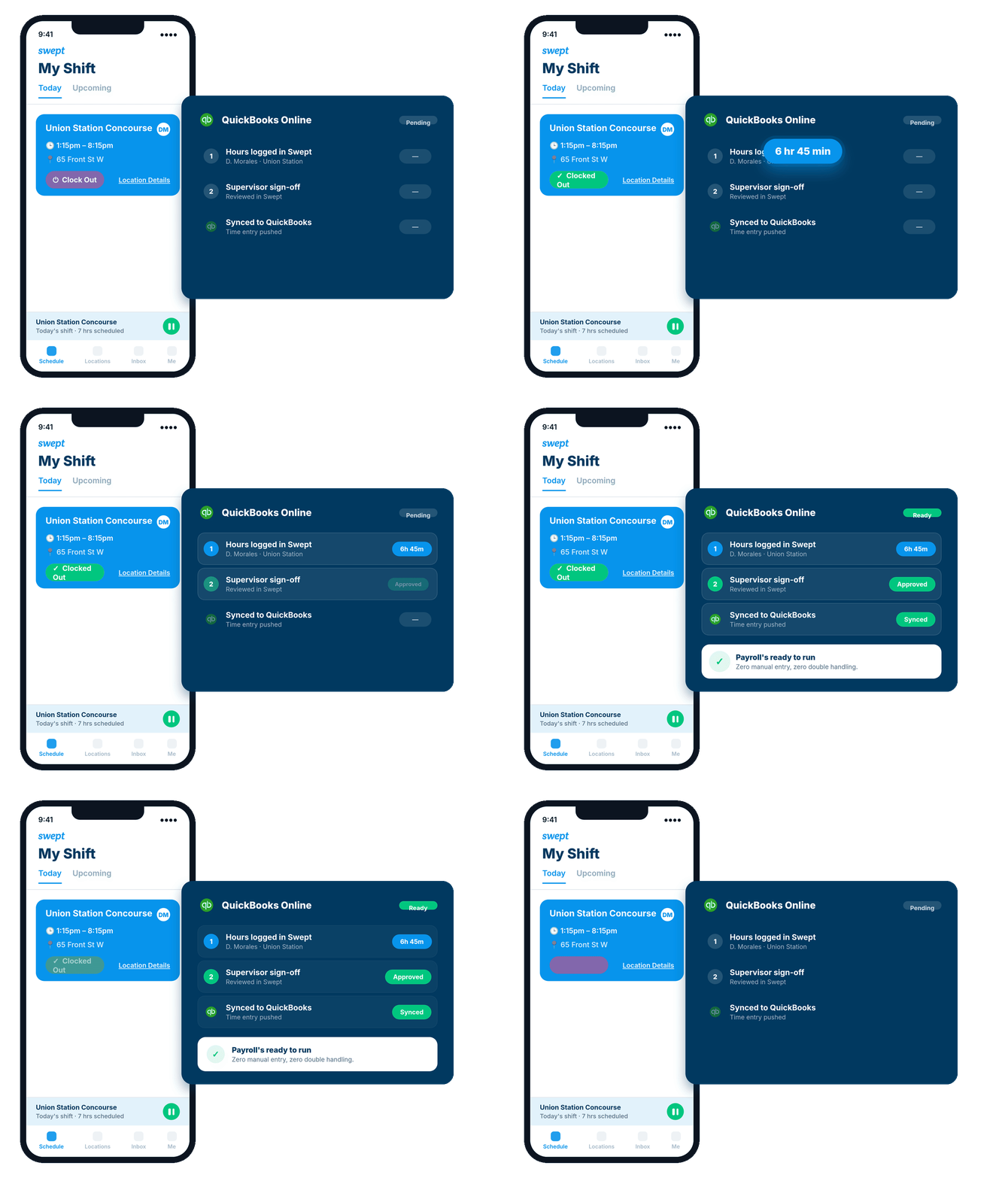
Approved hours arrive in QuickBooks Online as time entries, ready for your regular payroll process.
- See pending, synced, and error statuses
- Fix exceptions before they slow payday down
qb
QuickBooks Online · Time Entries
Jenna Lim
7.00 hrs
Synced
Paloma Dimate
4.00 hrs
Synced
Kris Sanchez
3.02 hrs
Error
Kris Sanchez needs an employee match before this entry can sync.
Why Swept
Get everything in place before payday.
Swept keeps cleaner hours, approvals, employee records, and sync status connected, so you can see what is ready, catch what needs attention, and move into payday with peace of mind.
-
The hours are already there Cleaner time is captured in Swept and ready for review.
-
Problems show themselves Unmatched employees and sync errors are easy to find and fix.
-
Payroll keeps moving Approved hours flow into QuickBooks without another manual handoff.
FAQ
Your QuickBooks questions, answered.
What to know about the payroll handoff before you connect.
Does Swept replace QuickBooks or run payroll?
No. Swept prepares and sends approved hours. You still process payroll in QuickBooks Online using your existing payroll setup.
Can I keep using QuickBooks the way I do today?
Yes. Swept improves the handoff into QuickBooks without changing where you manage pay rates, overtime rules, or payroll.
What exactly syncs to QuickBooks Online?
Manager-approved employee hours sync from Swept into QuickBooks Online as time entries.
Does Swept sync overtime or pay rates?
No. Swept sends approved hours as time entries. Your pay rates and overtime rules stay in QuickBooks Online and are applied there when payroll runs.
What if an employee is missing from QuickBooks?
Match an existing record or create the employee in QuickBooks directly from Swept. No screen switching required.
How will I know if something did not sync?
Every entry shows a pending, synced, or error status in Swept, so you can find and fix issues before payroll runs.
Does the integration work with QuickBooks Desktop?
No. This integration is built for QuickBooks Online.
Make payday easier
Ready for a calmer payday?
See how Swept keeps cleaner hours accurate, approved, and moving into QuickBooks Online.
Included in Scale
QuickBooks Online
Implementation support included